3.2″ LCD Wireless Video Baby Monitor: Night Vision + Talk
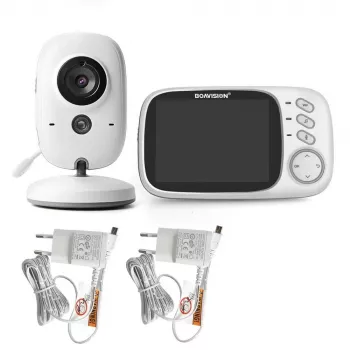
Wireless Video Baby Monitor with 3.2″ LCD, Night Vision & Two-Way Audio
A dependable baby monitor helps caregivers check in quickly—especially during naps, nighttime, and moments when hands are full. This wireless video monitor pairs a 3.2-inch LCD screen with night vision and two-way audio to support clear check-ins, calm reassurance, and everyday routines without complicated setup.
What a Video Baby Monitor Needs to Handle Every Day
Daily life with a baby is full of quick transitions: a sudden nap, a noisy sibling in the next room, or a work call that can’t be paused. A practical video monitor should make check-ins feel effortless rather than like another task to manage.
- Instant visual check-ins for naps, bedtime, and independent play
- Clear sound for hearing fussing, cooing, or changes in breathing rhythm
- A screen that is easy to read at a glance without unlocking a phone
- Reliable nighttime visibility without bright lights in the nursery
- Two-way talk so a familiar voice can soothe between room visits
Core Features at a Glance
This monitor focuses on the essentials that come up most often—seeing, hearing, and responding quickly—without requiring extra apps or constant phone use.
- 3.2-inch LCD display designed for quick, no-distraction viewing
- Night vision for monitoring in dark rooms
- Two-way audio for talking and comforting from another room
- Wireless connection between camera and monitor for flexible placement
- Practical, compact setup suited to nurseries, bedrooms, and temporary sleep spaces
| Feature | What it does | Why it matters during daily use |
|---|---|---|
| 3.2″ LCD screen | Shows live video on a dedicated handheld monitor | Faster check-ins than switching apps; easy for caregivers and grandparents |
| Night vision | Enables visibility in low or no light | Helps confirm safe sleep positioning without turning on lights |
| Two-way audio | Lets caregivers speak through the camera unit | Reassures baby during wakeups and reduces unnecessary room entries |
| Wireless monitoring | Connects camera to display without running video cables | More flexibility for room layout, travel, or shared spaces |
How Night Vision and the LCD Screen Improve Nighttime Routines
Nighttime is when a monitor earns its spot on the nightstand. Being able to check the crib without flipping on a lamp can keep the whole house calmer—especially during light-sleep phases when babies may resettle quickly.
- Supports quick checks after a sound or movement without fully waking the household
- Reduces the need for bright lamps that can disrupt a baby’s sleep cycle
- A dedicated LCD monitor keeps attention focused—no notifications, calls, or app distractions
- Helpful for split shifts: one caregiver can monitor quietly while another rests
Night vision is also useful for confirming basics—blanket-free sleep space, a pacifier within reach, or whether a baby is stirring versus fully awake. For broader guidance on sleep setup, review safe sleep recommendations from the American Academy of Pediatrics (HealthyChildren.org) and the CDC’s safe sleep resources.
Two-Way Audio: When a Voice Helps More Than a Visit
Not every sound needs an immediate room entry. Two-way talk can help you respond in a way that matches the moment—whether that’s gentle reassurance or a quick “I’m here” while you finish washing bottles.
- Useful for brief reassurance when a baby stirs but may settle independently
- Helps during transitions like sleep training approaches that include verbal comfort
- Supports multi-room living (apartment layouts, two-story homes, or home offices)
- Can be used for quick cues with older infants and toddlers (e.g., “It’s bedtime”)
A calm voice can also reduce “false alarm” trips that accidentally wake a baby further. If crying escalates or something feels off, the monitor makes it easier to decide when an in-person check is truly needed.
Setup and Placement Basics for Clearer Monitoring
A few placement choices can make the view clearer and the experience smoother day after day. The goal is a stable, wide view of the sleep area—without creating cord risks.
- Position the camera to capture the full sleep surface while keeping cords well out of reach
- Aim for a stable mounting spot to reduce vibration and improve image clarity
- Keep the monitor charged and in a consistent location for fast grab-and-go checks
- Test night vision visibility in a fully dark room and adjust angle to avoid glare
- Maintain safe sleep practices: monitoring complements—but does not replace—safe crib setup and caregiver supervision
Who This Monitor Fits Best
Care, Safety, and Real-World Use Tips
Product Details and Where to Get It
Featured product: Wireless Video Baby Monitor with 3.2″ LCD, Night Vision & Two-Way Audio
Also in stock (helpful add-ons for families on the go)
- Minimalist Travel Packing Planner | Digital Packing Guide for Light, Smart & Stress-Free Trips (digital)
- Travel Security & Scam Awareness Guide | Digital Safety Handbook for Tourists, Solo Travelers & Business Trips (digital)
FAQ
Does night vision work in a completely dark room?
Night vision is designed for low-light and no-light viewing, so it should still provide a visible image in a dark nursery. For best clarity, test it in full darkness and adjust the camera angle to reduce glare or reflections.
Can two-way audio help soothe a baby back to sleep?
Many babies respond to a familiar voice, so two-way audio can offer quick reassurance without entering the room right away. If crying escalates or you suspect a need like a diaper change, an in-person check is still the better choice.
Where should the camera be placed for the best view?
Place the camera in a stable, elevated position aimed at the full sleep surface so you can see the crib clearly. Keep any cords secured and well out of reach, and confirm the view in both daytime and nighttime lighting.












Leave a comment